I resurrected this blog a couple of weeks back. And almost immediately ran into the same old problem.
Creating image assets.
Icon, header banner, hero image — each has its purpose and steps to make it just right. Each one a context switch. Each context switch a little death to the flow state.
So I built a tool that eliminates the problem entirely.
The Problem Nobody Talks About
The content creation workflow for images looks like this:
idea → open Midjourney → prompt → iterate → download
     → open CDN dashboard → upload → copy URL → paste into post
That's six steps across three or four different tools. Every single time.
WordPress and similar frameworks collapse the last three steps. But the first five? Still painful. Multiply by five or ten images per blog post and you've burned 30-60 minutes on logistics, not creativity.
These context switches kill the flow. You lose your train of thought. The process feels like a grind.
What If the Image Came to You?
MCP — Model Context Protocol — is an open standard by Anthropic that lets AI agents tap into functionality not natively available to them. Think of it like calling an API, but the AI doesn't need to know the technical details. It just knows what capabilities exist and how to use them.
My moment of clarity: What if Claude could generate AND upload images directly? One conversation. Start to finish.
Here's the workflow now:
Me:    "Generate a hero image for my blog post about async JavaScript"
Claude: [shows 3 variations with preview URLs]
Me:    "The second one"
Claude: "Uploaded. Here's your URL: https://images.yourdomain.com/2026/02/async-js-hero.jpg"
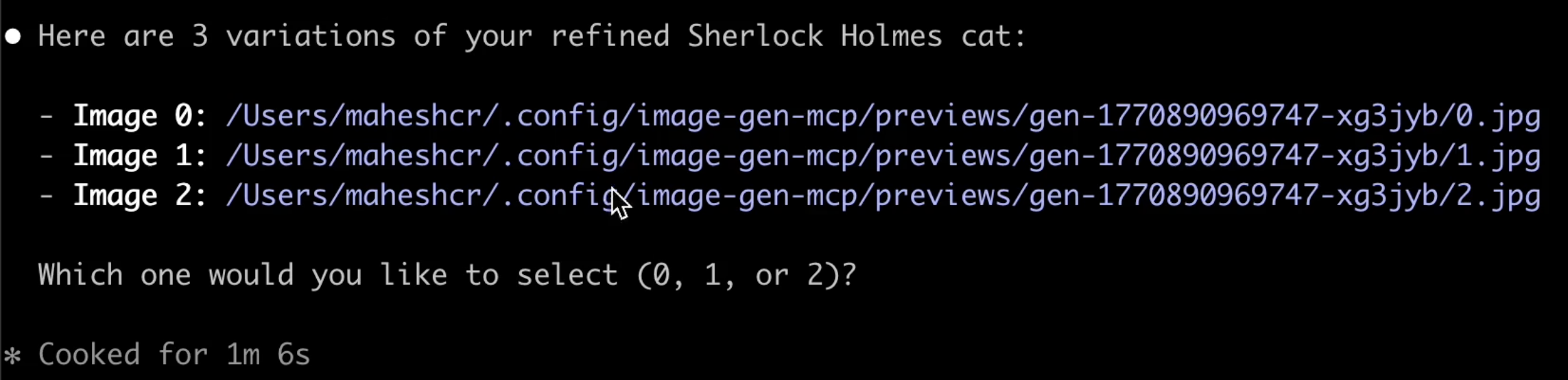
I never left the terminal.
What I Built
image-gen-mcp — an MCP server that handles the full image lifecycle: generate, preview, select, upload, serve. Not just generation. The whole pipeline.
- Google Gemini — free tier available, excellent quality, zero cost to start
- Fal.ai — fast Flux models (Schnell, Dev, SDXL) at ~$0.01-0.03 per image
Swap providers with a single config change. No lock-in.
Cloud Storage With Zero Friction
- Cloudflare R2 — S3-compatible, free egress. No bandwidth bills for serving images. Your images get a permanent CDN URL the moment you select them.
- Local storage — for development and testing
Cost Tracking
Even at $0.02 per image, a brainstorming session adds up fast. Built-in SQLite-backed cost tracking with monthly budget limits. Query costs by day, week, month. Never get surprised by a bill.
Interactive Setup
npx image-gen-mcp setup walks you through provider selection, API keys, storage config, and budget setup. No config file spelunking required.
In-Session Configuration
Switch providers, change models, adjust budgets — all from within Claude Code. No restart needed.
Architecture Decisions
I had specific requirements:
| Requirement | Decision |
|---|---|
| No prompt modification | The MCP does not "enhance" your prompt. I wanted to see exactly what each model returns for my exact words. |
| Preview before upload | Generate 1-4 variations, pick the winner, then upload to cloud. Don't waste storage on rejects. |
| Provider-agnostic | The text-to-image space is competitive. Today's best model is tomorrow's second choice. |
| Cost-aware | Budget tracking is a first-class feature, not an afterthought. |
Tech stack: TypeScript, MCP SDK, SQLite, Zod. No heavy cloud SDKs for generation — lightweight, fast startup.
The Numbers
- ~2,100 lines of production TypeScript
- 264 unit tests, all passing
- CI tested on Node 18, 20, and 22
- 37 kB published package size
- Interactive CLI setup wizard
- MIT licensed
Results
Before: 4-5 minutes per image. The generation itself is seconds, but the iteration loop — generate, review, tweak, regenerate, download, upload — is slow. And every context switch risks losing the train of thought.
Now: 2-3 generation rounds, 3 images each, all from within the console. 1-2 minutes to final selection.
The time savings look modest on paper. But factor in cognitive overhead from context switching, and it's significant. The real win is staying in flow.
Get Started
git clone https://github.com/maheshcr/image-gen-mcp.git
cd image-gen-mcp
npm install && npm run build
npm run setup        # Interactive wizard
claude mcp add image-gen "node $(pwd)/dist/server.js"
Restart Claude Code. Say: "Generate an image of..."
That's it.
What's Next
- More providers on the roadmap (Together.ai, Replicate, HuggingFace)
- Backblaze B2 storage support
- Community contributions welcome
I built this for myself. Open-sourcing it because the MCP ecosystem needs more practical, non-trivial examples. If this saves you time, or if you build on it, let me know.